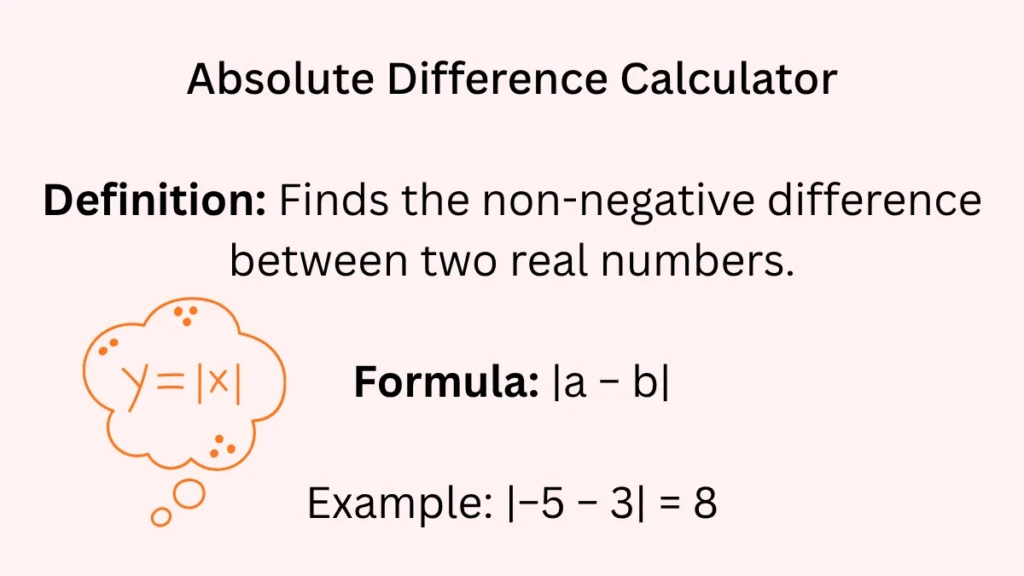
Enter two numbers and get the positive distance between them. The answer is never negative. Good for math homework, data comparison, or quick checks. Works as a find distance between two numbers tool, an absolute value difference calculator, and a math difference calculator online.
Visit related:
Difference of two squares calculator
Date difference calculator
What Is an Absolute Difference Calculator? Let Me Explain It Simply
If I had to explain this to my students in one sentence, I’d say: It’s a tool that tells you how far apart two numbers are, like measuring the distance between two houses on the same street.
Here’s what happens in my classroom: I ask students to think of two numbers that matter to them. Last week, Jamie picked her math test scores: 78 and 92. She typed them into our absolute difference calculator and got 14. That’s 14 points of improvement – a concrete number she could feel good about.
The calculator does something our brains sometimes struggle with: it ignores which number is bigger. It just gives you the gap. Whether it’s 92-78 or 78-92, the distance is still 14 points. For kids who get tangled up with negative signs (and honestly, for adults too), this is a game-changer.
Why You’ll Actually Use This Calculator in Real Life
I used to think this was just a classroom tool until I started noticing how often I reach for it outside school. Last month alone, I used it for:
Budgeting: My grocery bill was $127 against my $150 budget. The calculator showed a $23 difference. Nice to see that number in black and white.
Travel planning: Flight A cost $389, Flight B cost $425. A $36 difference. Was the more expensive flight $36 better? That became my real question.
Home projects: The shelf was supposed to be 48 inches wide. My measurement said 47.5 inches. Half an inch difference. Could I live with that? (Spoiler: I could.)
What surprises people is how often they’re already doing this math in their heads without realizing it. The calculator just makes it faster and mistake-proof.
The Actual Formula Behind Your Absolute Difference Calculator
Here’s the honest truth about the formula: it’s simpler than most recipes. It’s just:
|first number – second number|
Those vertical lines are the key. They mean “make whatever’s inside positive.” Think of them as parentheses that refuse to deliver negative answers.
Let me give you a real example from last week’s parent-teacher conferences. Mr. Henderson was confused about his daughter’s progress. Her first science test was 65%, her second was 82%.
We used the formula: |82 – 65| = |17| = 17
But here’s where it got interesting. He’d been doing the subtraction in his head as 65 – 82 and getting -17, which felt like “negative progress” to him. The absolute difference calculator showed him the truth: 17 points of actual improvement, no negative sign attached.
How I Teach Students to Use the Calculator Step by Step
When I introduce this tool to a new class, I use a physical analogy they all understand: steps.
Step 1: Choose your two landmarks
I have students stand in two spots in the classroom. Sarah stands at the door (that’s our first number). Jamal stands at the window (second number).
Step 2: Measure the distance between them
We count the floor tiles between Sarah and Jamal. Let’s say it’s 8 tiles.
Step 3: Notice something important
Then I have them swap spots. Jamal at the door, Sarah at the window. We count again: still 8 tiles.
That’s the whole concept. The distance doesn’t care who’s at which point. The absolute difference calculator works exactly the same way.
In calculator terms:
Type your first number
Type your second number
Hit calculate
Get the distance
No worrying about which number goes first. No negative signs to interpret. Just clean, straightforward distance.
Real Examples From My Classroom (And My Kitchen)
Example 1: The Temperature Surprise
Two Februaries ago, we had a bizarre weather week. Monday: 15°F. Wednesday: 42°F. My students argued about how much warmer it got.
Some said 27 degrees (42-15). Some said -27 degrees (15-42). Both felt right depending on their thinking.
We used the calculator: |42 – 15| = 27
The lesson? When we talk about temperature change, we usually mean the absolute change. That 27-degree swing was all anyone needed to know to dress appropriately.
Example 2: The Birthday Budget
My nephew saved $120 for his friend’s birthday gift. The perfect video game cost $135. He thought he was $15 short.
Calculator: |120 – 135| = 15
But here’s what we discussed: was that $15 a dealbreaker? Could he do an extra chore? Wait a week? The calculator gave us the number, then we had the real conversation about what to do with that information.
Example 3: The Running Time Improvement
I’m training for a 5K. Last week’s time: 28 minutes 45 seconds. This week: 26 minutes 30 seconds.
First, I converted both to seconds (1725 and 1590). Then the calculator: |1725 – 1590| = 135 seconds improvement.
That’s 2 minutes and 15 seconds faster. Seeing that number motivated me more than just knowing I’d “done better.”
Example 4: The Recipe Adjustment
Back to my kitchen. My grandmother’s soup recipe serves 6. I needed to serve 8. The recipe calls for 4 carrots for 6 people.
Per person: 4 ÷ 6 = 0.667 carrots per person
For 8 people: 0.667 × 8 = 5.336 carrots
Calculator: |5.336 – 4| = 1.336
I needed about 1⅓ more carrots. The calculator helped me adjust without guesswork.
Example 5: The Gas Mileage Check
My car’s trip computer said I got 32.4 MPG on my last tank. The sticker said it should get 34 MPG.
Calculator: |32.4 – 34| = 1.6
I was 1.6 MPG under expected. Was that due to my driving, the weather, or normal variation? The number started a useful investigation.
A Handy Table I Keep On My Fridge
I actually printed this and stuck it on my refrigerator. My family uses it more than I expected:
| What You’re Comparing | Example Numbers | Absolute Difference | What It Tells You |
|---|---|---|---|
| Test scores | 88 and 92 | 4 points | How close they are |
| Cooking temperatures | 350°F and 375°F | 25 degrees | Oven adjustment needed |
| Sale prices | $19.99 and $24.99 | $5.00 | How much you’re saving |
| Growth measurements | 58 inches and 60 inches | 2 inches | Growth over time |
| Exercise reps | 15 and 20 | 5 reps | Progress in workout |
| Recipe ingredients | 2 cups and 2.25 cups | 0.25 cups | Measurement error |
| Time estimates | 30 minutes and 45 minutes | 15 minutes | How off your guess was |
The table helps people see this isn’t just “math class stuff.” It’s practical, everyday number sense.
The Number Line Trick That Makes It Click
Here’s my secret teaching weapon: I don’t start with the calculator. I start with a clothesline.
I string a line across my classroom with numbers pinned to it. Two students hold numbers. We count the clothespins between them. That’s the absolute difference.
The “aha” moment always comes when I have them swap numbers. The distance stays the same. The calculator is just doing this counting for you, but faster and with any numbers, not just integers.
Last month, a student named Carlos who’d been struggling with negative numbers spent 20 minutes with the clothesline and different number pairs. When he finally used the calculator and got the same results, he literally said, “Oh, it’s just counting spaces.” That breakthrough was worth every minute.
Common Mistakes I’ve Seen (And How to Avoid Them)
After a decade of teaching this, I can predict the stumbles:
The Negative Number Freak-Out
Student sees | -5 – 3 | and freezes. They want to make both numbers positive first. I tell them: “Let the calculator handle the negatives. It knows what to do.” The answer is 8, whether you believe it or not.
The Order Anxiety
“Do I put the bigger number first?” No. It doesn’t matter. Test it. Put 10 and 4, then 4 and 10. Same answer every time.
The “But What Does Negative Mean?” Trap
If regular subtraction gives you -12, students want to interpret the negative. Sometimes you need that information. But when you just want the gap, the absolute difference calculator strips away the directional meaning intentionally.
The Unit Amnesia
Comparing 1 foot and 8 inches without converting first. The calculator will give you a number, but it’s meaningless. Always use the same units.
The Decimal Point Panic
| 7.5 – 7.0 | = 0.5, not 5. I’ve seen this mistake on kitchen scales, medicine doses, and measurement tapes. The calculator keeps the decimal where it belongs.
The beauty of the tool is that it prevents most of these errors if you just trust it.
What the Calculator Can’t Do (And That’s Okay)
Let’s be honest about limitations:
It won’t tell you direction. If you get 15, you don’t know if it’s +15 or -15. Sometimes you need that plus/minus information.
It’s for pairs only. Comparing three test scores? You’ll need to do multiple calculations.
It assumes you want magnitude. Sometimes relative difference matters more. $5 difference on a $10 item is huge. $5 difference on a $1000 item is negligible.
It can’t read context. The calculator doesn’t know if you’re comparing temperatures, prices, or test scores. You provide the meaning.
Despite these limits, for probably 80% of the “how different are these?” questions in daily life, it’s exactly what you need.
Questions Real People Have Asked Me About This Calculator
“My child got 15 as the difference between 7 and 22. Is that right?”
Yes. |7 – 22| = 15. The distance between 7 and 22 on a number line is 15 spaces.
“Why would I use this instead of just subtracting?”
When you care about the size of the gap, not which way the gap goes. If temperatures went from 40° to 30°, that’s a 10-degree change. The “negative” in regular subtraction just confuses the physical reality.
“Can it handle my recipe conversions?”
Perfectly. That’s one of my most common uses. Converting servings up or down becomes simple math instead of kitchen guesswork.
“What’s the biggest number it can handle?”
For practical purposes, there isn’t one. Even national debt numbers or astronomical distances work fine.
“My result was 0. What does that mean?”
Your numbers are identical. In cooking, that means perfect measurement. In grading, that means no change between tests.
“Do I need a special app?”
Nope. Any basic calculator with absolute value function works, or use our free online one that works on phones, tablets, or computers.
“How is this different from percentage?”
Absolute difference gives you the actual amount (10 pounds). Percentage gives you relative amount (5% of body weight). Different tools for different questions.
“Can businesses use this?”
Constantly. Inventory counts vs expected, budget variances, sales targets vs actual – all absolute difference calculations.
“What if my numbers have different units?”
Convert first. The calculator doesn’t know inches from centimeters. 12 inches and 1 foot need to both be inches or both feet first.
“Any tips for remembering how to use it?”
Think: “How far apart are these?” not “Which is bigger?” That mental shift changes everything.
“My student is struggling with math. Will this help?”
In my experience, yes. It builds confidence with numbers by providing immediate, correct answers while they learn the concepts.
“What’s the most surprising use you’ve seen?”
A student used it to track differences in video game scores between friends. Then he started noticing he could use it for homework too.
“Is it really free?”
Our online version is completely free, no signup, no limits. I insist on this because every student should have access to good math tools.
“How accurate is it?”
Mathematically perfect. If you put in exact numbers, you get exact differences.
“Can I use it on my phone?”
Yes, and it’s actually easier on touchscreens. Big buttons, clear display, works in portrait or landscape.
Try This Today: Your First Absolute Difference Calculation
Here’s my challenge: look around right now and find two numbers to compare. Maybe:
The time now and the time you need to leave
Two prices for something on your desk
Today’s date and a friend’s birthday
Your age and a family member’s age
Type them into the calculator. See what you get. That immediate result – that concrete number – is satisfying in a way abstract math rarely is.
What I’ve learned from watching students use this tool is that confidence builds quickly. The first calculation feels like a trick. The fifth feels familiar. By the tenth, they’re using it without thinking – and understanding number relationships better than ever before.
Other Tools That Pair Well With This Calculator
If you find yourself reaching for the absolute difference calculator often, you might also like:
Percentage Calculator – For when relative differences matter (like sale discounts)
Unit Converter – Essential companion for cooking or DIY projects
Fraction Calculator – Because recipes love fractions
Running Total Calculator – For keeping track of multiple differences
Average Calculator – When you need to find a middle point between numbers
Each serves a different purpose, but they all share the same goal: making numbers work for you instead of you working for numbers.
My Final Thought (From One Number User to Another)
Last week, a former student visited my classroom. She’s in college now studying engineering. “You know what tool I use most?” she said. “That absolute difference calculator concept. We use it for tolerance checking in manufacturing.”
She’s checking if machine parts are within specification. I’m checking if I have enough milk for tomorrow’s coffee. Same mathematical concept, different applications.
That’s the beautiful thing about understanding how to find the distance between numbers. It’s not academic abstraction. It’s the difference between a recipe that works and one that doesn’t. Between a budget that balances and one that doesn’t. Between understanding your progress and just hoping you’re improving.
The calculator isn’t the point. The understanding is. But sometimes, the calculator is the bridge to that understanding.
Give it a try with something simple today. You might find, like my students and I have, that you use it more often than you’d think.