Enter old value and new value, and the percentage increase calculator gives you the percentage increase. Tracks growth over time. Works as a calculate growth percentage online tool, an old to new value increase calculator, or a percentage rise estimator free.
Percentage Increase Calculator
Calculation Result
Read more:
Percentage calculator
Discount calculator
What is a Percentage Increase Calculator, Anyway?
In simple terms, a Percentage Increase Calculator is like a growth-measuring tape for numbers.
You give it two numbers:
The “Before” Number: (Your old score, the original price, last month’s followers)
The “After” Number: (Your new score, the sale price, this month’s followers)
It does some quick math and tells you: “The ‘after’ number is X% bigger than the ‘before’ number.”
Why is this useful? Because percentages let you compare apples to oranges. Knowing you saved $5 is okay. Knowing that’s a 25% discount tells you it was a really good deal relative to the price. It’s the difference between knowing a plant grew 10 inches (cool) and knowing it grew 40% (whoa, it had a major growth spurt!).
What Does It Actually Do?
Imagine you have a smoothie. Your friend has a bigger smoothie. You want to know how much bigger theirs is compared to yours. You could just say, “Yours has 4 more ounces!” But if your smoothie is tiny, 4 ounces is huge. If your smoothie is gigantic, 4 ounces is just a sip.
The Percentage Increase Calculator solves this. It doesn’t just measure the extra “ounces.” It measures how significant those extra ounces are compared to the size of your original smoothie.
You type in your smoothie size (Original) and their smoothie size (New). It spits out a percentage. That percentage is your universal answer for “how much bigger.”
When Will I Actually Use This?
All. The. Time. Seriously.
School: Test improvements, grade changes, population growth in history class, experiment results in science.
Your Money: Figuring out a tip, calculating a discount, seeing how much your allowance increased, checking if a “20% off” sale tag is correct.
Gaming & Hobbies: Damage increase on a new weapon, follower growth on your social media, improvement in your 5k run time.
Just Understanding Stuff: News says “inflation increased by 3%” – what does that mean for your pizza money? This tool helps you figure it out.
It takes the guesswork and the “did I do that math right?” anxiety out of the equation.
The Simple Formula Behind the Magic
Don’t panic when you see a formula. It’s just a set of cooking instructions for math. Here’s the recipe for Percentage Increase:
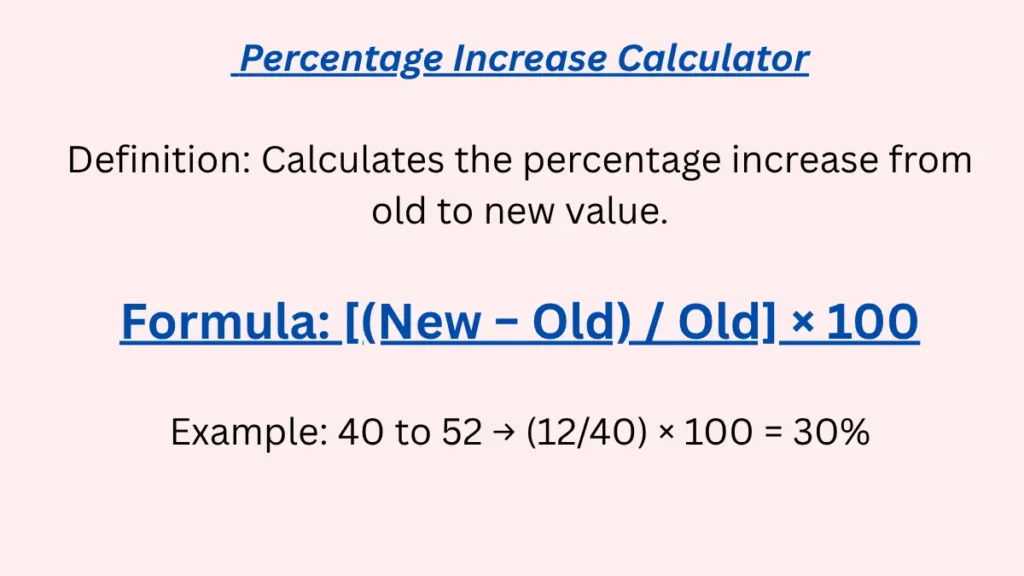
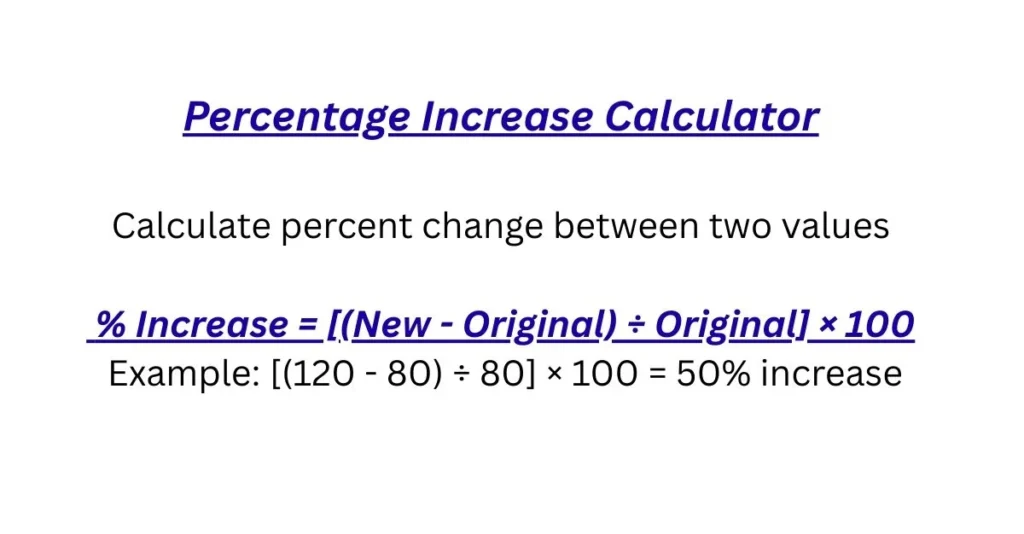
( New Value – Old Value ) / Old Value x 100
Let’s break it down like we’re making a sandwich:
Find the Difference (The “Meat”):
(New - Old). This is easy. How much more do you have? If your video game score went from 1,000 to 1,300, the difference is 300. This is the actual, numerical increase.Compare to the Original (The “Bread”):
/ Old. This is the key step! You take that difference (300) and divide it by your original score (1,000). So, 300 / 1000 = 0.3. This answers: “What fraction of my original score is this increase?” Here, the increase is 0.3 (or three-tenths) of the original.Make it a Percentage (The “Wrapper”):
x 100. Fractions are cool, but people talk in percentages. 0.3 x 100 = 30%. “Percent” means “per hundred.” So 30% means “30 out of every 100.” Your new score is 30% higher than your old one.
Why compare to the old value? Because it’s fair! A 50-point increase feels amazing on a 100-point test (that’s 50%!), but it’s just a tiny bump on a 1,000-point leaderboard (only 5%). The formula shows you the scale of the win.
How the Calculator Does Its Thing
When you type numbers into the Percentage Increase Calculator, it’s just following those three sandwich steps super fast:
Step 1: It subtracts. It checks, “Is the new number bigger? Yes? Good.”
Step 2: It divides the difference by the old number.
Step 3: It multiplies by 100 and says, “Here’s your percentage!”
It also handles the decimals and rounding so you get a nice, clean number like 15.5% or 33%.
Pro Tip: The calculator works with just the numbers. YOU have to make sure the units are the same. Don’t put “5 dollars” as the old and “500 cents” as the new. Convert them both to dollars or both to cents first!
Let’s Practice: Real Student Examples
Example 1: The Test Score Glow-Up
Old Score (Midterm): 70
New Score (Final): 84
Calculation in your head: Difference = 84 – 70 = 14. Fraction of original = 14 / 70 = 0.20. Percentage = 0.20 x 100 = 20%.
What it means: You didn’t just score 14 more points. You improved your performance by 20% compared to your midterm. That’s a huge leap!
Example 2: The Sneaker Sale
Old Price: $120
New Price (on sale): $90
Wait a second… The new price is lower. This isn’t an increase, it’s a decrease! A percentage increase calculator would give you a negative number here. For a sale, you’d want a percentage decrease calculator. Let’s pick a better example.
Example 2 (Fixed): Your Growing Plant
Old Height (April 1st): 10 inches
New Height (May 1st): 16 inches
Calculation: Difference = 6 inches. Fraction = 6 / 10 = 0.60. Percentage = 60%.
What it means: Your plant grew by 60% of its original height in one month. That’s not just growth; that’s a explosion!
Example 3: Social Media Hype
Old Follower Count: 250
New Follower Count: 1,000
Calculation: Difference = 750. Fraction = 750 / 250 = 3.00. Percentage = 300%.
What it means: A 300% increase doesn’t mean you have 300 followers. It means you tripled your followers (original 100% + 200% increase = 300% total, which is 3 times 250).
See the Pattern: A Handy Table
Let’s keep the “Old Value” at 100 to see how things change.
| You Started With: | You Ended With: | Straight-Up Increase: | Percentage Increase: | In Simple Words… |
|---|---|---|---|---|
| 100 | 110 | +10 | 10% | A little bit bigger. |
| 100 | 125 | +25 | 25% | Noticeably bigger. |
| 100 | 150 | +50 | 50% | Half-again-as-big. |
| 100 | 200 | +100 | 100% | Double. Twice as big! |
| 100 | 350 | +250 | 250% | Three-and-a-half times as big. |
Oops! Common Slip-Ups (And How to Avoid Them)
The Backwards Mix-Up: Putting the new number first and the old number second. Always ask: “Which happened FIRST?” That’s your OLD value.
The “Where’s the Percent?” Forget: You do (New-Old)/Old and get 0.45. That’s not 0.45%! That’s 45%. Remember the final “x 100” step!
The Unit Blunder: Old = 1.5 meters, New = 150 centimeters. These look different to the calculator! Convert 1.5 meters to 150 cm first. Always use the same units.
The “Of” vs. “Increase” Confusion: Increasing your 50 to 60 is a 20% increase. But 60 is 120% of 50. They’re related, but the “increase” focuses just on the change (the extra 10).
Is This Calculator Perfect?
It’s perfect at the math, but only if you use it right.
Garbage In, Garbage Out: If you put in wrong numbers, you’ll get a wrong percentage. Double-check your inputs!
The Zero Problem: You can’t calculate a percentage increase from zero. If you had 0 followers and now have 10, you just… started from zero. The formula breaks (can’t divide by zero!).
It’s a Snapshot: This calculates growth between TWO points. For growth over a long time (like compound interest in a savings account), you’d need a more complex tool.
Your Questions, Answered (FAQs)
Q: My answer was negative. What gives?
A: That means your “new” number was smaller than your “old” number. You calculated a decrease, not an increase. Check your order!
Q: What’s the difference between “percentage increase” and “percentage points”?
A: Great question! If your grade goes from 80% to 90%, that’s a 10 percentage point increase (90-80=10). But it’s a 12.5% increase because (10/80)*100=12.5. The first is simple subtraction; the second is relative growth.
Q: Should I round my answer?
A: For most school and real-life stuff, yes! Rounding to one decimal (like 16.7%) or a whole number (17%) is totally fine and easier to read.
Q: Can I use this for a percentage decrease?
A: You can, but you’ll get a negative number, which is weird. It’s clearer to use a Percentage Decrease Calculator, which is designed to give you a positive “percent down” number.
Q: Is a 200% increase a doubling?
A: No, that’s a tripling! Think of it this way: 100% increase = double (add the whole original again). 200% increase = add two times the original on top of it, so you end up with triple.
Q: Help! I know the percent increase and the new value, but I need the old value.
A: No problem! That’s like working backward. If a price after a 25% increase is $125, the original was $125 / 1.25 = $100. (The 1.25 comes from 100% + 25% = 125%, or 1.25 as a decimal).
Q: Is there a fast way to guess the percentage?
A: Sure! For a 10% increase, just move the decimal one place. A 50% increase is half. A 100% increase is double. Use these to check if your answer seems reasonable.
Ready, Set, Calculate!
The best way to learn is to play with it. Grab two numbers from your life right now.
Your phone battery percentage from an hour ago and now.
The number of unread emails you had this morning vs. now.
Your score on two similar video game levels.
Plug them into the Percentage Increase Calculator and see what you get. Does the percentage match what you felt happened?
Want to explore more? Check out these related tools:
Percentage Decrease Calculator: For when things get smaller (prices drop, time decreases, scores go down).
Percentage Difference Calculator: Perfect for comparing any two numbers to see how far apart they are (like comparing your score to your friend’s).
Final Grade Calculator: A real-world lifesaver that uses percentage weights to figure out what you need on your final exam.