Force Calculator
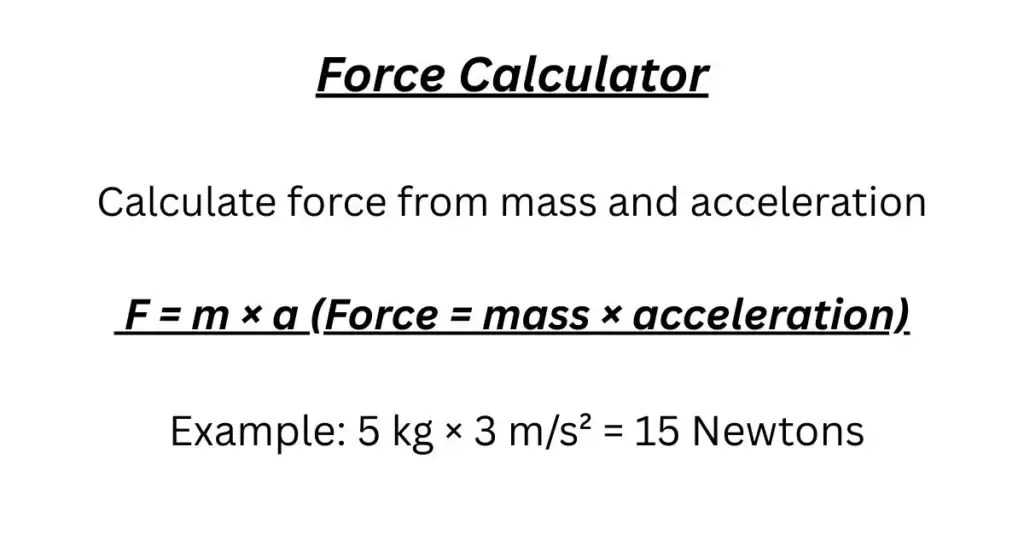
Calculate force using Newton's second law: F = m × a
1 Newton (N) = 1 kg·m/s²
How to use this calculator:
- Enter the mass of the object in kilograms (kg)
- Enter the acceleration in meters per second squared (m/s²)
- Click "Calculate Force" to compute the force in Newtons (N)
- Use "Clear All" to reset all fields and results
Why You Need a Force Calculator for Physics Class
Look, I’ve been teaching physics long enough to know what keeps students up at night. It’s not the concepts – most students understand that force makes things move. It’s the calculations. That’s where our Force Calculator comes in. When you’re staring at homework problems at 11 PM, wondering if your numbers make sense, this tool becomes your best friend.
Remember pushing your little cousin on a swing? Light push for a small kid, harder push for a bigger one. That’s force calculation in real life. Our Force Calculator just puts numbers to what you already understand. Whether you’re studying for tomorrow’s test or working on a science fair project, this guide will walk you through force calculations without the confusion.
What Is a Force Calculator? A Simple Explanation
Here’s the plain truth: A Force Calculator is a tool that does the math for F = m × a problems. You give it mass and acceleration, it gives you force.
Let me break that down. In physics class, you’re always being asked: “What’s the force?” Maybe it’s a car accelerating, a ball being thrown, or a box being pushed. The Force Calculator takes the numbers you have and multiplies them correctly every single time. No misplaced decimals. No multiplication errors. Just clean, correct force calculation.
Think of it this way: You’re the detective figuring out “who dunnit” – you identify the mass and acceleration. The Force Calculator is your lab technician who runs the tests perfectly. Together, you solve the physics mystery. This force calculation partnership means you can focus on understanding the problem while the calculator handles the arithmetic.
How Students Actually Use the Force Calculator
In my classroom, I see three main ways students benefit from using a Force Calculator:
First – checking homework. You’ve worked through five force calculation problems. Are they right? Instead of wondering, you quickly verify with the calculator. This builds confidence and catches small mistakes before they become bad habits.
Second – understanding relationships. What happens to force if mass doubles? With the Force Calculator, you can test this in seconds. Enter 2 kg at 3 m/s², then 4 kg at 3 m/s². See the force double. This visual learning sticks better than any lecture about proportional relationships.
Third – building number sense. After using the Force Calculator on enough problems, you start developing intuition. You’ll know that 50 newtons is reasonable for pushing a desk, while 5,000 newtons is car-engine territory. This physical intuition makes you better at spotting your own errors.
Here’s my classroom rule: Try the problem yourself first. Think through it. Write your solution. Then use the Force Calculator to check. This approach respects your learning process while giving you reliable feedback on your force calculation skills.
The F = ma Formula – What It Really Means
Let’s talk about the formula behind every Force Calculator:
F = m × a
I write this on my whiteboard every semester. Here’s how I explain it to students:
F is Force – Measured in newtons (N). One newton feels like holding a small apple. When you lift that apple against gravity, you’re using about one newton of force.
m is Mass – Measured in kilograms (kg). Important: Mass isn’t weight. Your mass is the same on Earth, the Moon, or in space. It’s how much “stuff” you’re made of and how resistant you are to changing your motion.
a is Acceleration – Measured in meters per second squared (m/s²). This tells how quickly speed changes. Positive means speeding up. Negative means slowing down. Earth’s gravity gives 9.8 m/s² downward acceleration.
The multiplication sign (×) is crucial. It means force depends on BOTH mass AND acceleration working together. This isn’t addition. If you double the mass (keeping acceleration same), force doubles exactly. If you triple the acceleration (keeping mass same), force triples exactly.
This multiplication relationship is why the Force Calculator works so well. The math is straightforward multiplication. The understanding comes from knowing what numbers to multiply.
How to Use the Force Calculator: A Teacher’s Walkthrough
Let me show you exactly how to use the Force Calculator, step by step:
Step 1: Get Your Numbers Ready
Before you even open the calculator, identify what you know. Most force calculation problems give you mass and acceleration. Write them down WITH UNITS. If mass is in grams, convert to kilograms (divide by 1000). Example: 500 grams = 0.5 kilograms.
Step 2: Enter Mass Correctly
Find the “mass” box. Enter your number in KILOGRAMS. Common mistake: Students see “500 g” and enter “500” instead of “0.5.” The Force Calculator will give an answer, but it will be 1000 times too big!
Step 3: Enter Acceleration Carefully
Find the “acceleration” box. Enter in m/s². Earth’s gravity? Use 9.8. Something slowing down? Use a negative number. Car accelerating? Might be 2 or 3 m/s².
Step 4: Calculate and THINK
Click “calculate.” The Force Calculator shows force in newtons. STOP. Don’t just copy the number. Ask: “Does this make sense?” Pushing a textbook giving you 500 N? That’s suspicious – that’s like 50 textbooks worth of force! Probably wrong.
Step 5: Check Your Work
If the force calculation seems wrong, check: Did I convert units? Did I use the right acceleration? Is my decimal placed correctly? The Force Calculator doesn’t know if your inputs are right – it just multiplies what you give it.
Real Examples from My Physics Class
Let me show you actual problems we solve using the Force Calculator:
Example 1: Pushing a Shopping Cart
Empty cart: mass = 20 kg. You push to accelerate at 0.5 m/s² (gentle push).
Force Calculator: 20 × 0.5 = 10 N
That’s 10 newtons – about the weight of a 1 kg textbook. Feels right.
Full cart: mass = 50 kg. Same 0.5 m/s² acceleration.
Force Calculator: 50 × 0.5 = 25 N
More force needed. Makes sense – fuller cart is harder to push.
Example 2: Car Stopping
Car mass = 1,200 kg. Braking deceleration = -6 m/s² (moderate stop).
Force Calculator: 1,200 × (-6) = -7,200 N
Negative means opposite direction of motion. 7,200 newtons is significant force – explains why brakes get hot!
Example 3: Basketball Jump
Player mass = 75 kg. Jump acceleration = 12 m/s² upward.
Force Calculator: 75 × 12 = 900 N
But wait – gravity pulls down at 9.8 m/s² too. Legs must provide extra force to overcome gravity PLUS create upward acceleration. Total force from floor is actually 900 N + (75 × 9.8) = 900 + 735 = 1,635 N. That’s why jumping is hard work!
Each time you use the Force Calculator, follow this pattern: calculate, then think about what the number means in real life.
Common Mistakes I See Students Make
After eighteen years teaching, I see the same force calculation errors every year:
Mixing up units – This is the #1 mistake. The Force Calculator needs kilograms, not grams or pounds. If you weigh 150 pounds, that’s about 68 kilograms (150 ÷ 2.2). Enter 68, not 150.
Confusing mass and weight – Mass is kilograms. Weight is newtons. If a problem says “10 kg object,” that’s mass. If it says “weight of 98 N,” that’s force. You might need to convert before using the Force Calculator.
Forgetting negative signs – Slowing down means negative acceleration. The Force Calculator will give negative force. That’s correct physics – don’t ignore the minus sign!
Not thinking about other forces – F = ma gives NET force. If you’re pushing a box with friction, your applied force is bigger than the net force. The Force Calculator result is what’s left after all forces combine.
Accepting crazy answers – If the Force Calculator says pushing a pencil requires 100 N (like lifting 10 kg), that’s probably wrong. Develop a sense for reasonable forces.
My advice: Always write your values with units BEFORE using the Force Calculator. This simple habit catches most errors right away.
Where You’ll Actually Use Force Calculations
“Will I ever use this outside class?” Students ask me this every year. The answer is yes:
Sports – Coaches calculate forces to design better training. How much force does a sprinter push with? Force Calculator helps find out from mass and acceleration data.
Driving – Car engineers use force calculations for brakes, acceleration, and safety features. Those calculations keep people safe on the road.
Everyday decisions – Why does a full laundry basket feel heavier than an empty one? Force Calculator shows you exactly why – double the mass means double the force needed for same acceleration.
Exercise – When you lift weights, your muscles apply force. Understanding these forces helps prevent injuries and design better workouts.
DIY projects – Building a treehouse? Calculating forces helps make sure it’s safe and sturdy.
The truth is, once you understand force calculation, you start seeing it everywhere. You’ll appreciate why heavy trucks have longer stopping distances. You’ll understand why jumping on a trampoline feels different than jumping on concrete. You’ll become more aware of the physical world around you.
Your Force Calculator Questions Answered
How accurate is the Force Calculator?
Mathematically perfect for multiplication. If you give it correct inputs, you get correct outputs. The calculator won’t make arithmetic mistakes like humans sometimes do.
What if I only know weight, not mass?
Convert first. On Earth: mass = weight in newtons ÷ 9.8. Or if you have weight in pounds: mass in kg = pounds ÷ 2.2. THEN use the Force Calculator.
Can it handle different units?
Most basic Force Calculators need kilograms and m/s². Some fancy ones convert for you. Always check what your specific calculator expects.
Why multiplication instead of addition?
Because that’s how the physical world works. Experiments show that doubling mass (same acceleration) exactly doubles force. That’s multiplication, not addition.
What does 1 newton feel like?
Like holding a small apple or a stick of butter. With practice using the Force Calculator, you’ll develop a feel for different force amounts.
What if acceleration is zero?
Then force is zero. This doesn’t mean no forces exist – it means all forces balance out. Like a book on a table: gravity pulls down, table pushes up equally.
Can I use it for circular motion?
Yes, with centripetal acceleration. The Force Calculator still uses F = m × a, where a is v²/r.
Why different answers than my friend?
Check: Same units? Same values? The Force Calculator should give same results for same inputs. Differences usually mean someone used wrong units or values.
When shouldn’t I use F = ma?
For things near light speed (need relativity) or tiny particles (need quantum physics). For everyday objects – perfect.
How do I know if my answer is reasonable?
Compare: Pushing a door = 10-20 N. Lifting textbook = 15-25 N. Car accelerating = 2000-4000 N. Your Force Calculator result should be in the right ballpark.
What if mass changes (like rocket fuel)?
Then simple Force Calculator isn’t enough. You need more advanced math (calculus).
Can force be negative?
Yes! Negative force means opposite direction. In the Force Calculator, negative acceleration gives negative force.
How many decimal places should I use?
For most school work, 1-2 decimal places is fine. The Force Calculator might show more, but you can round appropriately.
Building Your Physics Understanding
Here’s my teaching secret: The best way to use the Force Calculator is to build your intuition.
Try this: Keep acceleration at 2 m/s². Change mass: 1 kg, 2 kg, 5 kg, 10 kg. Watch how force changes. See the pattern? Force doubles when mass doubles.
Now keep mass at 5 kg. Change acceleration: 1 m/s², 2 m/s², 5 m/s², 10 m/s². See how force changes with acceleration?
This hands-on experimentation with the Force Calculator teaches you more than any textbook explanation. You see the relationships. You feel the patterns. You build understanding that lasts.
Try Our Force Calculator Today
Now that you understand how force calculations work, I encourage you to try our Force Calculator with confidence. Start simple. Calculate the force to push your backpack across the floor. Find the force of gravity on your dog or cat. Play with numbers. See what happens.
As you get comfortable, you might find these related calculators useful:
Acceleration Calculator – For when you know force and mass but need acceleration.
Weight Calculator – Specifically for gravitational force calculations.
Friction Calculator – Because real-world physics usually involves friction.
Each calculator helps with different parts of physics problems. Together, they give you a complete toolkit for understanding forces and motion.
Remember what I tell my students: Physics isn’t about memorizing. It’s about understanding relationships. The Force Calculator helps you see those relationships clearly. Use it to check your work. Use it to explore. Use it to build confidence in your understanding of how our physical world works.